Field service & maintenance
AI Field Report Assistant
Turn a technician's voice notes and photos into structured, reviewable service reports — before they leave the site.

Product thesis
Field service companies bill for expertise, but their revenue leaks through documentation. Reports are written hours after the visit, from memory, on a laptop in the van or at home. They arrive late, miss billable details, and read differently depending on who wrote them. The interesting product is not “dictation for technicians” — it is a system of record for what happened on site, produced at the moment of maximum context and verified by the person who was there.
Who it serves
- Maintenance and installation companies with 10–500 technicians
- Operations managers who need consistent, auditable reports
- Back-office teams that turn reports into invoices and follow-up quotes
The problem, concretely
- Report writing is unpaid time — typically 30–60 minutes per technician per day
- Details forgotten between site and desk become disputes or unbilled work
- Every technician has a personal format; customers notice the inconsistency
- Photos live in camera rolls, disconnected from the jobs they document
- Managers can’t see job status until paperwork lands, sometimes days later
Product strategy
Capture on site, structure with AI, verify with the technician, deliver from the office. The strategic choices behind the concept:
- Hands-free first. Gloves, ladders, machine rooms: input is voice and camera, not typing. The interface is designed around large targets and short confirmations.
- Draft, never send. AI produces a proposed report. The technician reviews it on site in under two minutes; the office approves before the customer sees anything.
- Structure over prose. Output is typed data — tasks completed, parts used, anomalies, follow-up recommendations — so it can drive invoicing and planning, not just a PDF.
- Offline is the default. Basements and industrial sites have no signal. Everything works locally and synchronizes when connectivity returns.
Core user journey
- Check in on site job context loads offline
- Capture voice notes, photos, part scans
- AI drafts report structured, typed fields
- Technician verifies 2-minute on-site review
- Office approves edits tracked
- Customer delivery PDF + data export
Major features
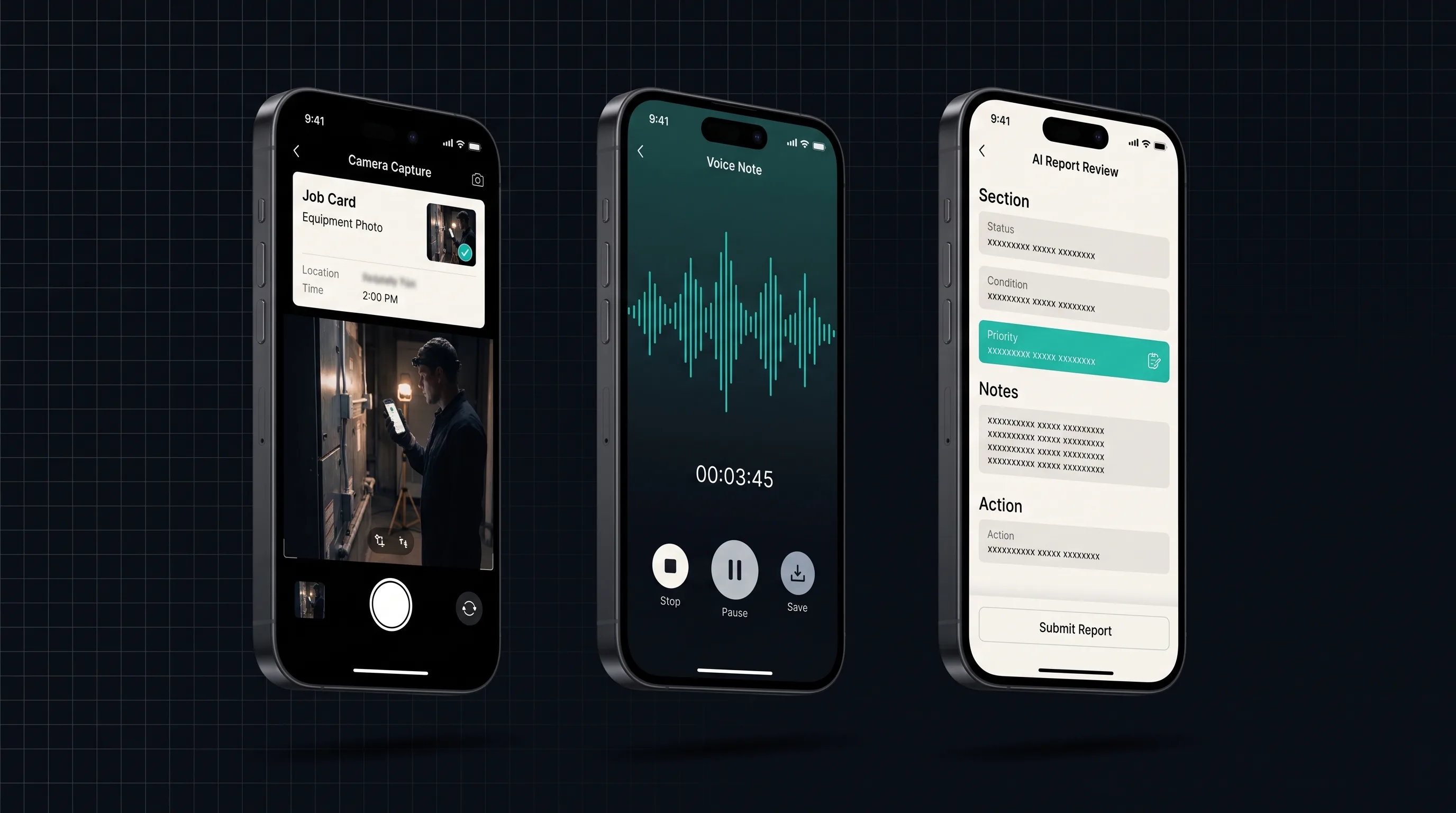
- Job-aware capture: every photo, clip, and scan is attached to the work order automatically
- Guided anomaly flow: flag an issue, mark severity, propose remediation in one pass
- Report composer: AI drafts sections from evidence; every claim links back to its source
- Parts and time tracking folded into the same capture stream
- Review console for the office: diff view of AI draft vs. technician edits
- Template packs per trade (HVAC, electrical, elevators, facilities)
Where AI fits — and where it must not
Speech-to-structure is the core: transcription, then extraction into the report schema (tasks, materials, measurements, observations). Photo understanding suggests captions and links images to checklist items. Retrieval over equipment manuals lets the assistant answer “what’s the torque spec here?” on site.
Deliberately out of AI’s hands: severity judgments, safety sign-offs, and anything the customer will rely on contractually. Those fields require explicit human input, and the UI makes AI-drafted content visually distinct until a person confirms it. If extraction confidence is low, the field arrives empty rather than plausible — an empty field gets filled; a wrong one gets signed.
System overview
- Mobile apps: offline-first store with an append-only capture log per job
- Sync service: conflict-free merges — capture events are immutable, reports are versioned
- AI pipeline: on-device transcription draft for immediacy; server-side re-processing for quality when the job uploads; extraction runs against a typed report schema with per-field confidence
- Review console: web app for dispatch and back office, with approval workflow and export hooks (PDF, CSV, and an API for invoicing systems)
Data & privacy considerations
Job sites are customers’ premises: photos may capture people, equipment identifiers, and commercially sensitive environments. The concept treats every capture as customer data — tenant-isolated storage, EU residency, retention windows per contract, and a redaction pass (faces, license plates) before anything leaves the review console. Voice recordings are deleted after transcription verification by default.
Accessibility considerations
High-glare and gloved conditions drive the same choices that serve accessibility: large touch targets, full voice operation, haptic confirmations, and a review screen that works with screen readers because the report is structured data, not a canvas of text boxes.
Prototype scope
A credible first prototype is narrow: one trade (HVAC), one template, capture → draft → verify on device, with the office console reduced to an approval queue. The hypothesis to test is behavioral, not technical: will technicians verify a draft on site in under two minutes rather than batch paperwork at night?
Evaluation plan
- Draft acceptance rate: share of AI-proposed fields kept without edit (target hypothesis: >70%)
- On-site verification time, measured against the two-minute design budget
- Extraction precision on a labeled set of 200 real-style voice notes per trade
- Report turnaround: capture-to-approval time vs. the current same-week baseline
- Trust check: do office reviewers stop re-reading every field after a month?
Risks and open questions
- Habit risk: night-time paperwork is a deep habit; on-site verification must feel faster, not added
- Liability boundaries: which fields may never be AI-prefilled varies by trade and jurisdiction
- Noise robustness: machine rooms are hostile to speech models; the capture UX needs a fallback that doesn’t punish the user
- Integration gravity: value compounds only when reports flow into existing invoicing tools
Delivery phases
- Discovery sprint with ride-alongs; report-schema definition per trade
- Capture + draft prototype, single trade, measured against the evaluation plan
- Review console and sync hardening; pilot with a design-partner company
- Template packs, integrations, and operational rollout
Expansion possibilities
Structured job history becomes an asset: predictive parts stocking, quote generation from anomaly patterns, and a searchable knowledge base of “how we fixed this last time” — each a product decision, not a default.